
A plan for the way you create.

From your next idea
to your whole team.

Start independently. Bring your team. Make the work.

OpenAIGoogleRunwayKling AISeedanceElevenLabsAnthropicLuma

Your first 100 credits are on us. One-time introductory credits. Start free

MonthlyYearly−20%+
Creator

A place to start creating.

$19

Per month · billed monthly

Explore ideas and make individual visuals, short promos and posts at your own pace.

  • 400 credits every month
  • 1080p exports with no watermark
  • Commercial use under the applicable terms
  • 10 GB storage
  • 2 concurrent generations
Start creating

Create an account, then choose your plan in Visuals.

What your credits can make.

Choose the model and settings for the work you want to make.

Popular models

Popular image and video generation capacity
ModelSettingsCredits per generationCreator 400 credits/monthPro 900 900 credits/month
Nano Banana 2512px3per imageUp to 133imagesUp to 300images
GPT Image 2Low; 1024 × 10241per imageUp to 400imagesUp to 900images
Nano Banana Pro1K / 2K7per imageUp to 57imagesUp to 128images
Gemini Omni 1.1 Flash720p; 4s target; audio included; 52-credit minimum52per clipUp to 7clipsUp to 17clips
Seedance 2.5480p; 4s; audio on/off; no source video21per clipUp to 19clipsUp to 42clips
Google Veo 3.1 Flash720p; 4s; no generated audio18per clipUp to 22clipsUp to 50clips
Kling V3 OmniStandard (720p); 5s; no generated audio60per clipUp to 6clipsUp to 15clips
Kling Avatar V2Standard; 15s; supplied speech audio60per clipUp to 6clipsUp to 15clips

Each row shows an alternative use of your monthly credits, not separate allowances. Counts use our updated credit schedule and the stated model and settings. Omni durations are prompt-guided targets and its minimum generation charge still applies. Reference inputs, additional attempts and other workflow steps may use more credits. Your run price is shown before you generate.

Annual billing changes your subscription price, not your monthly credits. Video counts are individual clips, not complete music videos or campaigns. Source-video examples assume you already have the input clip. Model availability depends on your plan and account.

Start with artwork.
Explore a direction.
Turn it into motion.

Bring the images and artwork you already have. Generate something new when you need it.

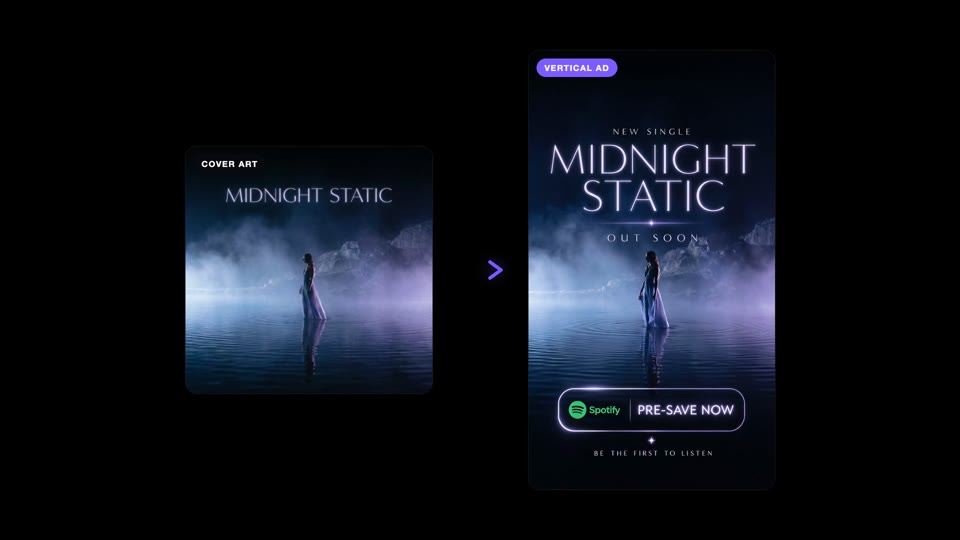
Midnight Static artwork alongside its vertical promotional visual
Silent preview

Artwork becomes motion

Give an existing release a new way to be seen.

A colourful doorway opens into the Hall Pass release artwork
Silent preview

More angles for the campaign

Explore ad variations from one visual direction.

A vertical music video cutdown in a neon-lit alley
Silent preview

A release, across the feed

Carry the world into short-form, vertical visuals.

Start with 100 credits

Explore the examples here, then make something of your own.

Creative services

Our creatives.
On your side.

Hire our team to make the content, build your workflows or help your people get more from AI. A dedicated creative partner, working in Visuals with you.

Content productionCustom FlowsTraining
Explore creative services

Bring the release, campaign or process you want help with.

Plan a project Services are scoped separately from platform seats.

A few things
worth knowing.

What can I use before choosing a paid plan?

New accounts receive 100 one-time credits to explore standard AI models, three video editor projects and 720p exports with a watermark. Media expires after seven days. These credits do not renew monthly. Paid plans add recurring credits, watermark-free exports and commercial use under the applicable terms.

What can I make with my credits?

Use the model comparison above to see example image and video counts. Choose the model and settings that fit your work. Each example uses the same monthly credit pool.

Do annual plans include more generations each month?

Annual billing gives you a lower subscription price. Your monthly credit allowance and generation counts stay the same.

Why can a project use more credits than the table shows?

References, settings, additional attempts and other workflow steps can change the total. You can review the price for your run before you generate.

Can I use images and artwork I already have?

Yes. Using an existing image is not a new image generation. AI editing and video generation still use credits for the work you choose.

What if I need more credits?

Choose a larger Pro allowance or purchase an available credit pack in the app. For team production, book a demo to discuss your setup and usage.

How do I start a Team plan?

Team starts at $60 per seat per month, or $48 per seat per month billed annually, with a two-seat minimum. Book a demo to confirm credit allocation, workspace setup and onboarding.

Can I choose more credits on Pro?

Yes. Pro has several monthly credit tiers. Choose the allowance on this page to compare the subscription price, then select the corresponding plan in Visuals.

How does yearly billing work?

The yearly option shows an equivalent monthly price and the total charged annually. Recurring credits are allocated monthly. Review the subscription details at checkout.

Can I cancel my subscription?

You can manage and cancel your subscription in the app's billing settings. Review your current renewal date and the effect on your allowance there.

Can I create commercial work?

Paid plans support commercial work under the applicable terms and model conditions. You remain responsible for the rights to the music, images and other materials you use.

Can you help build our creative process?

Yes. We can discuss onboarding and workflow implementation for your team or organization, including the Skills, Flows and production approach suited to your work.